Someone cancels their subscription and they're still in your Discord server two weeks later — still reading your content, still in your channels, still in your member list. You didn't notice. They didn't say anything. They just quietly kept the access they stopped paying for.
This is the access leakage problem. And unless you've automated Discord member removal on subscription cancellation, it's happening in your community right now.
Why manual removal doesn't work
Manual access auditing requires you to regularly cross-reference two systems: Stripe (who's paying) and Discord (who has a role). At 50 members, you might do this monthly. At 150, you do it less often because it takes longer. At 300+, it rarely gets done at all.
The cost isn't just the access leakage — members consuming content they're not paying for. It's the distorted picture your member count gives you. Your Discord shows 280 active members. Your Stripe shows 210 active subscriptions. Which number is real? Without automated removal, you can't trust either.
There's also the relationship cost. A member who cancelled two months ago and still has access is eventually going to notice. When they do, your community looks disorganised. Some will feel guilty and reach out. Most won't say anything — but it's not the impression a premium community should be leaving.
How automated Discord member removal works
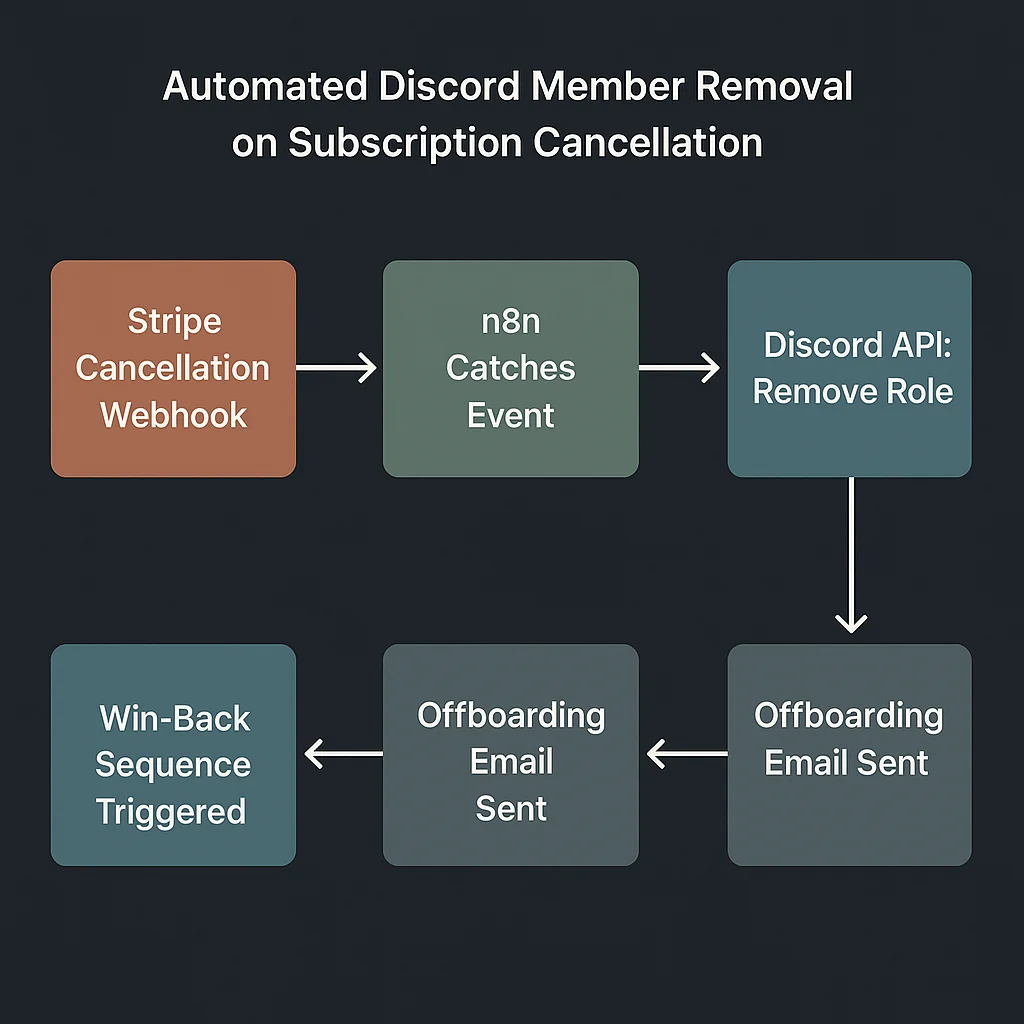
The mechanism is straightforward. Stripe fires a customer.subscription.deleted webhook the moment a subscription is cancelled — whether the member cancelled themselves, you cancelled it manually, or it lapsed after failed payment retries exhausted.
n8n receives that webhook, looks up the member's Discord user ID from your member database, and calls the Discord API to remove their role. The entire process takes under 5 seconds from cancellation to access removed. You don't touch it.
The same system handles subscription pauses, downgrades, and trial expirations — any Stripe event that should change or remove Discord access can be mapped to the appropriate Discord API action.
Building the cancellation workflow in n8n
Step 1: Catch the Stripe cancellation webhook
Your n8n Webhook node is already listening for Stripe events if you've built onboarding automation. Add customer.subscription.deleted to your webhook endpoint's event list in the Stripe dashboard. Your Switch node routes this event to the cancellation branch of your workflow.
Step 2: Look up the Discord user ID
The Stripe cancellation payload includes the customer's email and Stripe customer ID. Use an Airtable or Google Sheets node to search your member database for the corresponding Discord user ID — the one you stored during the original OAuth join flow when the member first signed up.
This lookup is why building your member database correctly from day one matters. If you don't have Discord user IDs stored and linked to Stripe customers, you can't automate removal. Fix the database first, then build the automation.
Step 3: Remove the Discord role via API
Use an HTTP Request node to call DELETE /guilds/{guild_id}/members/{user_id}/roles/{role_id} with your bot token in the Authorization header. The response will be a 204 No Content on success.
For multi-tier communities, you need to remove the specific role that corresponds to the cancelled subscription tier. If a member had multiple roles (e.g., a base member role plus a tier-specific role), remove both.
Step 4: Send an offboarding DM
Before the role is removed — while the bot can still DM the member — send a farewell message. Keep it clean and respectful. Acknowledge the cancellation, thank them for being a member, and include a link to rejoin if they change their mind. This is also your win-back entry point.
The timing matters: send the DM first, then remove the role. Once the role is removed, the member may lose access to DMs from your bot depending on your server settings.
Step 5: Update your member database and trigger win-back
Update the Airtable record to reflect the cancellation date and status. Then trigger your win-back email sequence — three emails over 30 days, with a specific reason to return, sent via your email platform. The email address is already in your Airtable record from onboarding.
Handling the grace period — intentional vs involuntary cancellation
Not all cancellations are equal. An intentional cancellation (member chose to cancel) should result in immediate role removal. An involuntary cancellation (subscription lapsed after failed payment retries) deserves a grace period — the member may not even know their payment failed.
Stripe distinguishes between these. customer.subscription.deleted fired after payment failures will have a cancellation reason of payment_failed in the payload. Use this to route to different branches:
- Voluntary cancellation → remove role immediately, send farewell DM, start win-back sequence
- Involuntary cancellation (payment_failed) → send dunning DM and email first, apply 4-day grace period, then remove role if payment not recovered
This distinction matters for member relationships. Treating a payment failure the same as a deliberate cancellation is how you lose members you could have kept.
Edge cases that trip up automated removal
Member left the Discord server before cancelling. The role removal API call will return a 404 — the user isn't in the server. Handle this gracefully with an error branch that logs the event and skips the removal step without failing the entire workflow.
Member has multiple subscriptions or tiers. Only remove the role corresponding to the cancelled subscription. If they have an active subscription at a different tier, that role should remain.
Discord user ID not found in your database. This happens when onboarding automation wasn't in place when the member originally joined. Build an error branch that logs this as an exception and sends you a Slack notification to handle manually.
What this connects to: the full Discord automation stack
Member removal is one piece of a connected system. The same n8n workflow infrastructure that handles cancellations also handles onboarding (role grant on payment, welcome DM), failed payment recovery (dunning sequences), and tier upgrades (role swaps). If you're only building removal now, the right move is to build the full lifecycle at the same time.
The complete setup is covered in our Discord automation for communities guide. For the technical setup of connecting Stripe to Discord for the first time, see the Stripe to Discord automation guide. If you're running a subscription bot service like LaunchPass and want to own this infrastructure yourself, the Discord subscription bot comparison covers your options.
What properly automated removal actually changes
Beyond the obvious — no more access leakage — automated Discord member removal on cancellation does three things that matter:
Your member count becomes accurate. Discord membership and Stripe subscriptions stay in sync. You can trust the numbers.
Your community feels more premium. Members who stay active know that access is genuinely gated. The content they're accessing has real value because it's not freely available to ex-members.
Win-back becomes possible. You can't run a win-back sequence if you don't have a clean record of who cancelled and when. Automated removal creates that record as a side effect. Communities with clean cancellation data and a proper win-back sequence recover 10–20% of churned members.
To see how much that recovery is worth in real numbers, use our community revenue calculator — plug in your member count, price, and churn rate, and it shows you the monthly revenue impact of a 10% win-back improvement.
Want this built for your community? Book a free strategy call — cancellation automation is typically live within a week.