Telegram has over 900 million users and its private channel feature is one of the cleanest setups for paid content delivery — no algorithm, no feed, just your content directly to your members. But Telegram has no native payment system. Connecting Stripe to Telegram requires an automation layer, and most guides either skip the details or stop at a toy example.
Here's exactly how to set up a paid Telegram channel with Stripe — including the parts that break if you do them wrong.
How paid Telegram channels work technically
A private Telegram channel can only be joined via an invite link. The link can be set to expire after one use or after a set time period. Your job is to generate a unique invite link the moment a Stripe payment is confirmed and deliver it to the paying member before they lose patience and request a refund.
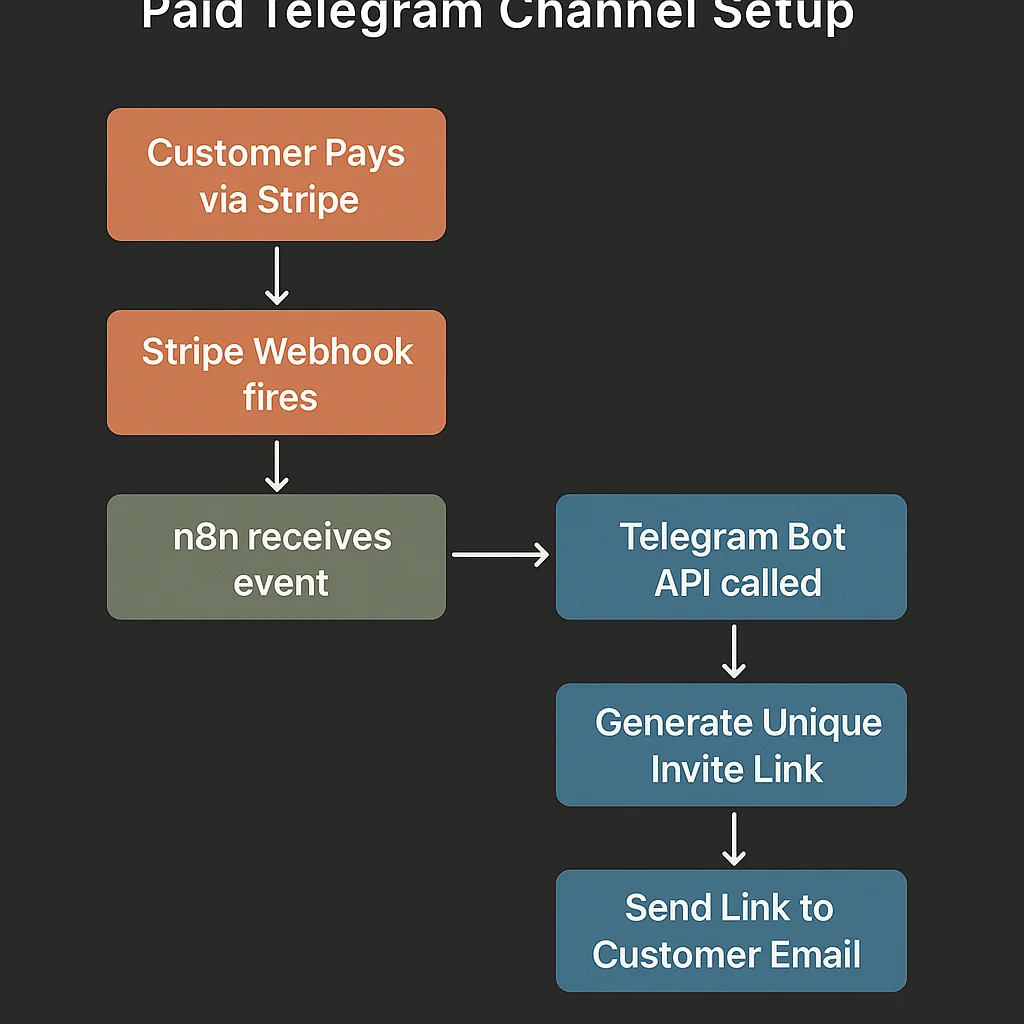
The automation chain: Stripe payment confirmed → webhook to n8n → Telegram Bot API generates unique invite link → invite link emailed and/or messaged to the paying member → member joins channel → access tracked in your member database.
The harder problem is removal on cancellation — Telegram doesn't natively know which users were added via which invite link, and its admin tools for removing specific members are manual. We'll cover how to solve that properly.
What you need before you start
- A Telegram Bot — created via @BotFather in Telegram. Free. Takes 2 minutes. Your bot needs to be an administrator of your private channel with the ability to create invite links and ban members.
- A private Telegram channel — not a group. Channels are one-way content delivery (only admins post). Groups allow member interaction. Either works for paid access, but the invite link mechanism is cleaner on channels.
- Stripe — set up with a subscription product and webhook endpoint.
- n8n — your automation layer connecting Stripe and the Telegram Bot API.
- Airtable — your member database. This is what makes automated removal possible.
Setting up the Telegram bot
Open Telegram and message @BotFather. Send /newbot, follow the prompts, and copy your bot token. This token is how n8n authenticates with the Telegram API.
Add the bot to your private channel as an administrator. Give it these specific permissions: Invite Users via Link, Ban Users. It needs both — one for granting access, one for removing it.
Get your channel ID. The easiest way: forward a message from your channel to @userinfobot, which returns the channel ID. It'll be a negative number starting with -100. Store it — you'll use it in every API call.
Building the Stripe-to-Telegram workflow in n8n
Step 1: Stripe webhook trigger
Create a Webhook node in n8n. Copy the URL and add it as a Stripe webhook endpoint listening for checkout.session.completed, customer.subscription.deleted, and invoice.payment_failed.
Verify the Stripe signature in n8n using your webhook signing secret. Required — don't skip this.
Step 2: Switch on event type
A Switch node routes based on $json.body.type. Payment confirmed goes to the onboarding branch. Subscription deleted goes to the removal branch. Payment failed goes to the dunning branch.
Step 3: Generate a unique Telegram invite link
For the onboarding branch, add an HTTP Request node:
- Method: POST
- URL:
https://api.telegram.org/bot{YOUR_BOT_TOKEN}/createChatInviteLink - Body:
{"chat_id": "YOUR_CHANNEL_ID", "member_limit": 1, "expire_date": null, "creates_join_request": false}
Setting member_limit: 1 means the link can only be used once. This is important — a shared invite link lets anyone join, not just the person who paid. One-use links are how you gate access properly.
The API response includes the invite link URL. Extract it from result.invite_link.
Step 4: Store member data and invite link in Airtable
Before delivering the invite link, create the member record in Airtable: customer email, Stripe customer ID, invite link, link creation date, subscription status. This record is what you'll use for removal — store the invite link here because Telegram's API lets you revoke a specific invite link later, which is your mechanism for preventing sharing.
Step 5: Send the invite link to the member
Two channels simultaneously:
Email — via Gmail or your email platform. Subject: "Your access to [Channel Name]". Body: a welcome message, the invite link prominently displayed, and clear instructions on what to do next. The link should be a large, obvious button or link — members who have to hunt for it will bounce.
Telegram message — if the member already uses Telegram and you know their username or chat ID (from a previous interaction or a pre-payment form), send them a direct message via your bot. More immediate than email.
Handling cancellations and removal
This is where most Telegram paid channel setups fail. You can't revoke a specific member's access directly once they've joined, because Telegram doesn't natively link a member's account to the invite link they used. You have to build this link yourself.
The approach: ask members for their Telegram username as part of the onboarding flow. A simple form (Typeform or a Telegram bot command) captures their @username or user ID immediately after payment. Store this in Airtable linked to their Stripe customer ID.
When customer.subscription.deleted fires in Stripe, n8n looks up the Telegram user ID from Airtable and calls the Telegram Bot API to ban (kick) the member from the channel:
- Method: POST
- URL:
https://api.telegram.org/bot{TOKEN}/banChatMember - Body:
{"chat_id": "CHANNEL_ID", "user_id": "TELEGRAM_USER_ID", "revoke_messages": false}
Set revoke_messages: false so you're only removing future access, not deleting their message history. After removing them, immediately unban (to allow potential rejoining later): call unbanChatMember with the same user ID.
The Telegram username capture problem
Getting Telegram usernames from paying members is the biggest friction point in this setup. The cleanest approaches:
Post-payment redirect to a form. After Stripe checkout, redirect to a Typeform asking for their Telegram username. The form submission fires a webhook to n8n, which stores the username and then triggers the invite link generation. The member gets their invite link only after submitting their username.
Bot-based verification. Send members a link to start a conversation with your Telegram bot. When they send /start, the bot captures their Telegram user ID automatically and triggers the invite link delivery. More seamless — the member doesn't have to fill in a form.
The bot-based approach is cleaner but requires a slightly more involved n8n setup. For communities where a frictionless experience matters, it's worth the extra build time.
Third-party services vs building your own
If you'd rather not configure n8n, there are Telegram-specific services that handle this out of the box:
- Subly — purpose-built for paid Telegram channels. Handles Stripe, invite link generation, and cancellation removal. Takes a platform fee.
- Combot Subscriptions — broader community management with subscription support.
The same build vs. buy trade-off applies here as with Discord: under 50 members, a third-party service saves time. Past £1,000 MRR, the custom n8n approach saves money. We've built the detailed technical comparison in our Stripe Telegram Bot guide — including the exact API calls for invite link generation and member removal.
If you want the same automation layer extended to a Discord community in parallel, the Stripe webhook infrastructure is identical — you just add Discord API calls alongside the Telegram ones. The full Discord side is in our Discord automation guide.
Failed payment handling for Telegram
The dunning sequence for Telegram works the same as Discord — don't remove access on the first failed payment. Run a 7-day grace period with email reminders before triggering removal. The Telegram-specific version sends a bot DM as well, which has significantly higher open rates than email alone.
Day 0: Payment fails → email + Telegram bot DM with card update link
Day 3: Reminder email, clear warning
Day 6: Final 24-hour warning
Day 7: Remove from channel, send bot message with reactivation link
For more detail on the dunning logic and how to recover failed payments before they become cancellations, see our guide on recovering revenue from failed payments.
What a properly built Telegram paid channel looks like
Member pays via Stripe. Within 30 seconds: a unique one-use invite link is generated, emailed to them, and a direct Telegram message is sent if their username was captured. They join the channel. Their record in Airtable is updated to Active.
When they cancel, their Telegram account is removed from the channel automatically. No manual admin. No ex-members reading new content. No access leakage.
Compared to Discord, Telegram has less native tooling for community features but offers a simpler, cleaner content delivery experience. For creators whose audience is already active on Telegram, it's a strong choice — especially combined with a proper automation layer.
If you want a paid Telegram channel setup with Stripe built for you, book a free strategy call. Most setups are live within a week.