You've built a paid Discord community. Someone pays at 11pm on a Sunday. They're excited. And then they wait — because you're asleep and the onboarding is manual. By Monday morning, the excitement has cooled. Some ask for refunds. Others ghost.
This guide shows you exactly how to automate paid Discord community onboarding so every member gets instant, professional access the moment their payment clears — regardless of when they join, and without you touching it.
Why onboarding automation is non-negotiable at scale
Manual onboarding has a ceiling. At 20 members you can manage it. At 100, you're spending hours every week checking Stripe, matching payments to Discord accounts, assigning roles, sending welcome messages. At 300, it's a part-time job that competes directly with running the community itself.
Beyond the time cost, manual onboarding creates inconsistency. Members who join on a quiet Tuesday get a thorough welcome. Members who join during a busy launch week get a role 12 hours later and a generic DM, if they're lucky. That inconsistency is a churn driver you can see clearly in your first-month retention numbers.
Automated Discord member onboarding solves both problems. Every member gets the same fast, professional experience. You get your time back.
What the automated onboarding flow looks like
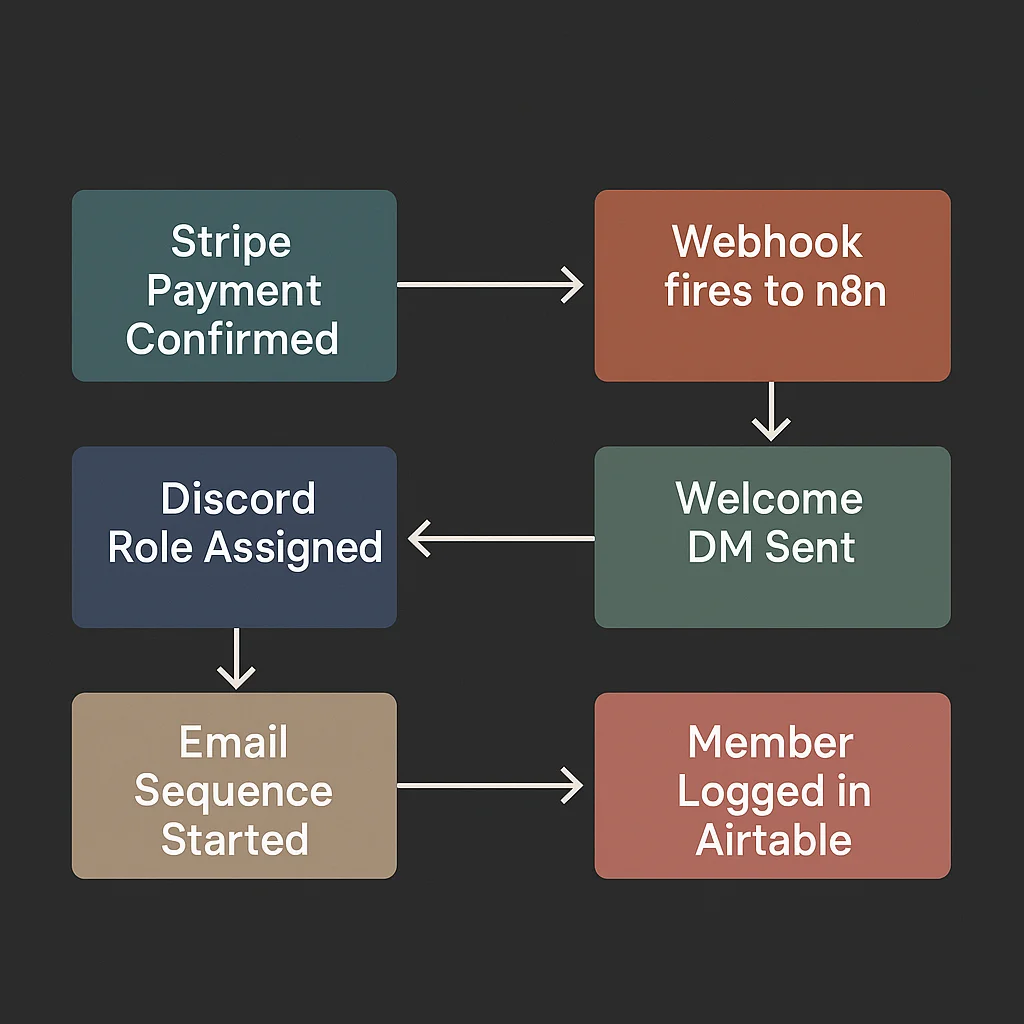
The full flow runs like this:
- Member completes payment on Stripe
- Stripe fires a
checkout.session.completedwebhook to n8n within seconds - n8n identifies the member's Discord user ID (via your OAuth join flow or member database)
- n8n calls the Discord API to assign the correct tier role
- n8n sends a personalised welcome DM via your Discord bot
- n8n adds the member to your email onboarding sequence
- n8n logs the new member in Airtable with join date, tier, and Stripe customer ID
Total elapsed time from payment to Discord access: under 5 seconds. The member doesn't wait. You don't touch it.
The Discord user ID problem — solve this first
Stripe knows your members by email address. Discord's API requires a user ID. These are two completely different identifiers, and bridging them is where most DIY automations break.
The cleanest solution is an OAuth join flow. After payment, redirect the member to a Discord OAuth authorisation page where they log in with their Discord account. This gives you their Discord user ID immediately and links it to their Stripe customer record in your member database (Airtable or a simple Google Sheet works fine).
Without this link, you cannot automate access removal when they cancel — which is the other half of the membership lifecycle. Build it right from the start.
Setting up the Stripe webhook
In your Stripe dashboard, go to Webhooks and create a new endpoint pointing to your n8n webhook URL. You need these events at minimum for full paid Discord community onboarding automation:
checkout.session.completed— new member paid, trigger full onboardingcustomer.subscription.deleted— cancellation, trigger offboardinginvoice.payment_failed— payment failure, start dunning sequenceinvoice.payment_succeeded— payment recovered, restore access if in grace period
Always verify the webhook signature in n8n using your Stripe signing secret. An unverified endpoint accepts requests from anyone — including bad actors. This is a five-minute step that most tutorials skip and it matters.
Building the n8n workflow
n8n is the automation engine connecting Stripe and Discord. Here's what each step of the onboarding workflow looks like in n8n:
Step 1: Webhook node
Receives the Stripe payload and verifies the signature. Set to respond immediately so Stripe doesn't retry.
Step 2: Switch node
Routes based on event type. checkout.session.completed goes to onboarding. customer.subscription.deleted goes to offboarding. Unrecognised events go to a logging branch.
Step 3: HTTP Request node — fetch Discord user ID
Queries your Airtable member database using the Stripe customer email as the lookup key. Returns the Discord user ID stored there from the OAuth join flow.
Step 4: HTTP Request node — assign Discord role
Calls PUT /guilds/{guild_id}/members/{user_id}/roles/{role_id} with your bot token. The role ID matches the tier the member paid for. Multiple tiers need a mapping object — Starter plan maps to role ID X, Pro plan maps to role ID Y.
Step 5: HTTP Request node — send welcome DM
Opens a DM channel with the member via POST /users/@me/channels then sends the welcome message. Personalise it with their name from the Stripe payload.
Step 6: Email platform node
Adds the member to your email onboarding sequence. Use their email from the Stripe payload. ConvertKit, ActiveCampaign, and Klaviyo all have n8n integrations.
Step 7: Airtable node
Creates the member record with join date, Discord user ID, Stripe customer ID, tier, and onboarding status. You'll use this database for every subsequent lifecycle event — cancellation, upgrade, failed payment.
The welcome DM that actually works
Most automated welcome DMs are afterthoughts. One generic sentence. The member reads it, shrugs, and wanders into the server confused about where to go.
A good automated welcome DM does three things: tells the member exactly where to go first, gives them one specific action to take, and makes them feel like they've joined something organised. Something like:
"Welcome to [Community Name] — your [Tier] access is now live. Start in #start-here for the orientation guide, then drop an intro in #introductions. Your first week's content is pinned in #members-resources. Any questions, post in #support or reply here directly."
That takes 30 seconds to write once and goes to every member, perfectly, forever.
Handling failed payments in the onboarding context
Some members pay and their card fails on the first attempt. Stripe will retry, but during the retry window you need to handle access carefully. Best practice: grant access immediately on the first successful charge and build dunning logic separately for subscription renewals. Don't gate the initial access on payment retry — a member who just signed up should get in immediately on successful payment.
For subscription renewals, build a 4-day grace period. When invoice.payment_failed fires, send a DM and email asking them to update their payment details. Only remove access after the grace period expires with no recovery. This approach preserves member relationships and recovers a meaningful percentage of lapsed revenue.
Edge cases to build from day one
Member pays but doesn't join the Discord server. Add a 24-hour wait node after the role assignment step. If the member still hasn't joined the server (check via Discord API), send a follow-up email re-sending their invite link. Catches everyone who got distracted or missed the original instructions.
Multi-tier communities. Build a mapping object in n8n that translates Stripe product or price IDs to Discord role IDs. When a member upgrades, strip the old role and assign the new one in the same workflow triggered by customer.subscription.updated.
Bot role hierarchy. Your bot's role must sit above every member role in the Discord role list. This is a Discord permission requirement — bots can only manage roles positioned below their own. Check this before going live. It's the most common setup error.
What this saves you
A community with 200 members and 20% monthly churn is processing 40 onboarding events per month. Manually, at 15 minutes per member, that's 10 hours a month just on onboarding. Automated Discord member onboarding cuts that to near zero — a monitoring check-in every week, nothing more.
The member experience improvement is equally significant. Instant access, professional welcome, consistent onboarding for the 3am signup and the 3pm signup. That consistency shows up in your first-month retention rate within weeks of going live.
If you want to understand the full revenue picture — what your community earns, what you're losing to churn and failed payments — run your numbers through our community revenue calculator before you build anything. It'll show you exactly where automation pays off fastest.
Ready to have this built for you? Book a free strategy call — most onboarding systems are live within a week.