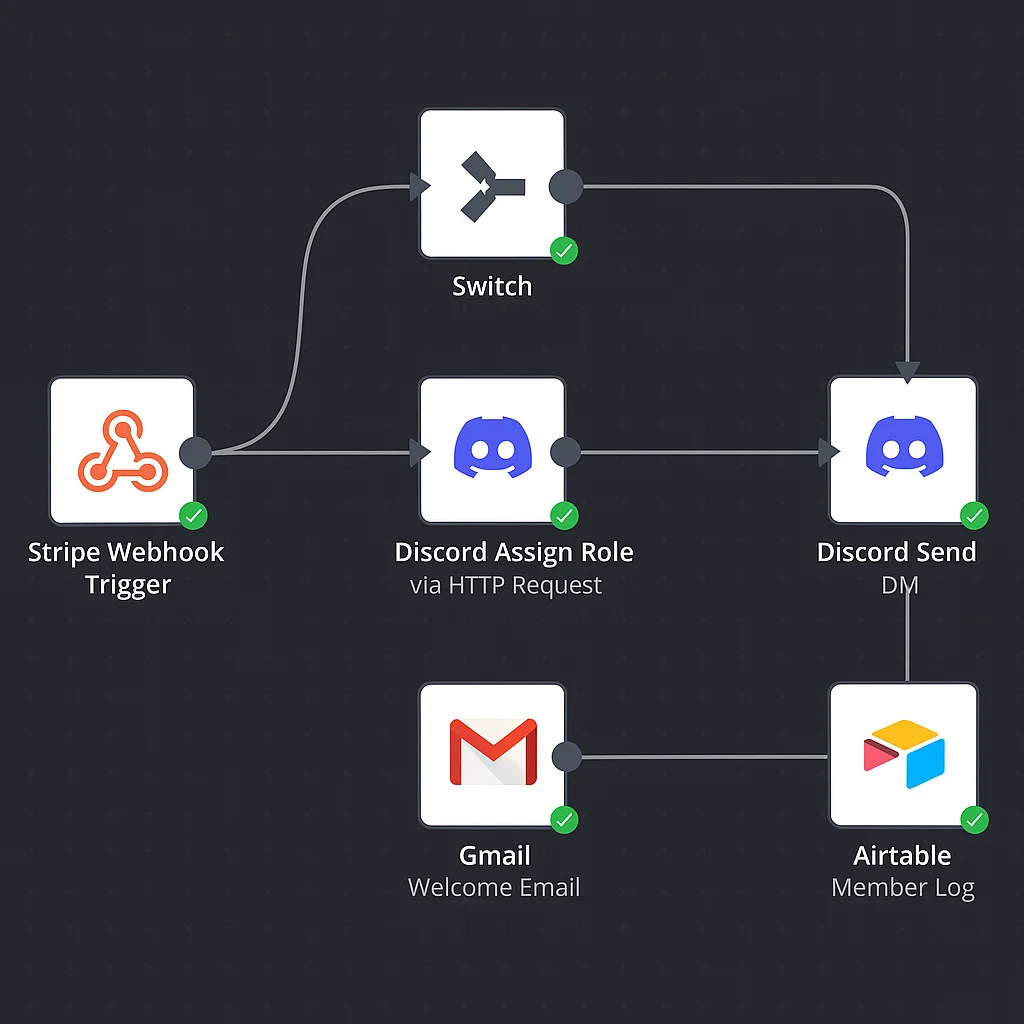
Most Discord server owners reach the same point — the community is growing, manual management is becoming a part-time job, and they know automation is the answer but aren't sure what that actually means in practice.
Here's exactly what a Discord server automation agency builds, and what changes when it's live.
What Discord automation actually covers
Discord has a full API. Almost everything you currently do manually inside a server — assigning roles, sending DMs, posting announcements, removing lapsed members — can be triggered automatically based on events that happen inside or outside the platform.
The events that drive most community automation:
- A payment confirmed in Stripe → member gets their role and a welcome DM within 2 seconds
- A subscription cancelled → role removed automatically, offboarding sequence begins
- A payment fails → dunning DM sent, grace period applied, role removed if unresolved
- A scheduled time triggers → weekly announcement posted, engagement prompt sent, digest delivered
- A member hits an inactivity threshold → re-engagement DM fired automatically
None of these require a human. All of them currently do, in most communities.
The automation stack we use
We build all Discord automation on n8n — an open-source workflow automation engine that connects Discord's API to every other tool in your stack. Stripe, your email platform, Airtable, Google Sheets, Slack — n8n sits in the middle and orchestrates everything.
Why n8n over a Discord-specific bot builder: n8n gives us full access to Discord's API with custom logic, conditional branching, and error handling that bot-specific tools can't replicate. When a payment has three different states (succeeded, failed, recovered), the logic that handles each path correctly needs a proper automation engine, not a simple bot.
A typical build: paid community automation
The most common project we take on is a paid Discord community that needs its membership lifecycle automated. Here's the workflow we build:
Onboarding: Stripe checkout confirmed → n8n identifies the Discord user ID via OAuth link → Discord API assigns the correct tier role → welcome DM sent with orientation guide → member added to email onboarding sequence → CRM record created.
Cancellation: Stripe subscription cancelled → n8n removes the Discord role → offboarding email sent → 30-day win-back sequence begins.
Failed payment: Stripe payment failed → DM sent with payment update link → 4-day grace period → if unresolved, role removed → win-back sequence triggered.
Scheduled content: Every Monday at 9am, a weekly community digest is posted to the announcements channel automatically. Every Friday, an engagement prompt goes to the most active discussion channel.
From the server owner's perspective: none of this requires any action. New members get professional, instant access. Lapsed members are handled cleanly. The server runs while the owner focuses on actual community building.
What the setup process looks like
Every project starts with a discovery call where we map your current manual processes and the tools you use. We then design the full automation architecture — what triggers what, how edge cases are handled, where data is stored.
Build takes 1–2 weeks depending on complexity. Every workflow includes error alerting — if something fails, you know immediately. Handoff includes full documentation and a walkthrough so you understand everything that was built.
If you want to talk through what automation looks like for your specific server, book a free strategy call.