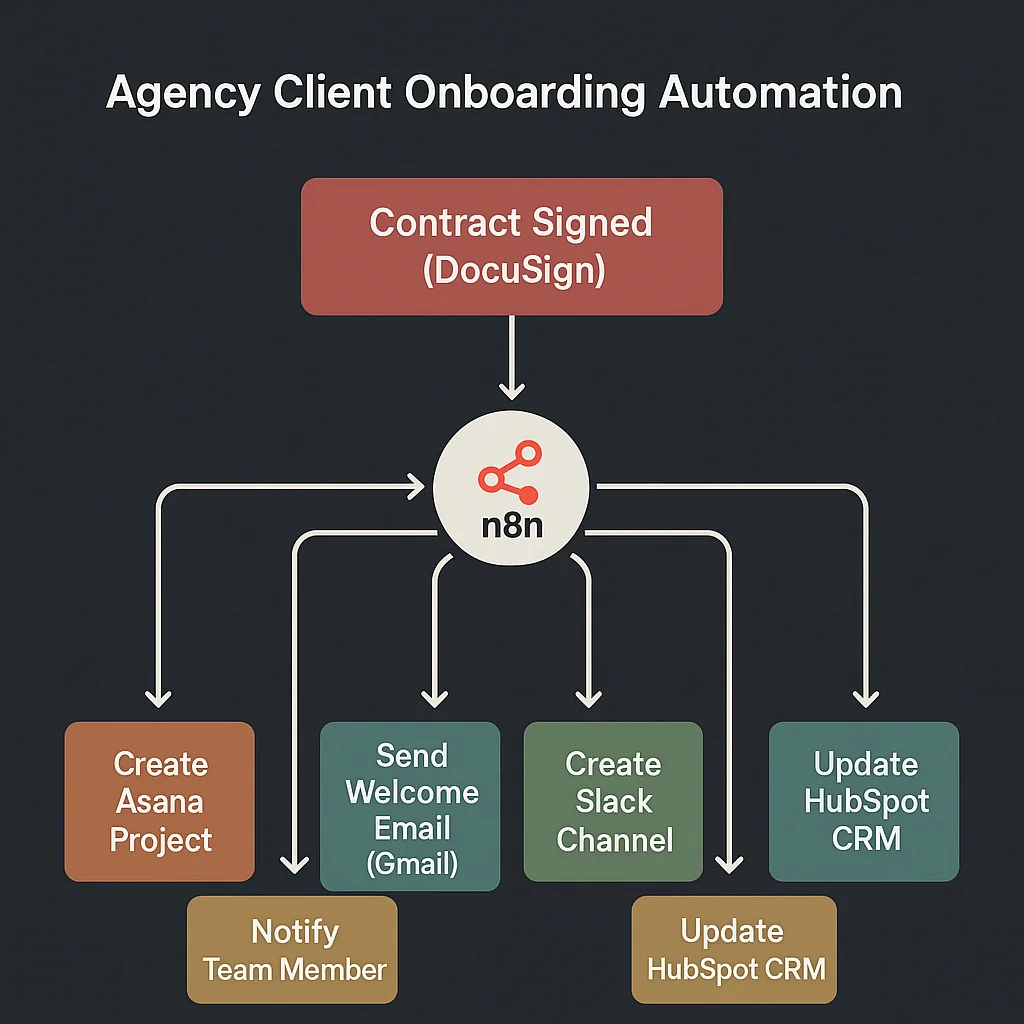
Every hour your team spends manually setting up new clients is an hour they're not spending on the work you're billing for. If your client onboarding relies on someone remembering a checklist, you're haemorrhaging time and delivering an inconsistent first impression.
Here's how to build an agency client onboarding automation workflow that fires the moment a contract is signed and handles every step without human input.
What a proper onboarding workflow covers
The goal is zero manual steps between "contract signed" and "client fully set up." Every action that doesn't require a genuine human decision should happen automatically. In most agencies, that's nearly everything in the first 48 hours:
- Welcome email with clear next steps
- Onboarding questionnaire delivered
- Project created in your PM tool with the right template applied
- Client added to your workspace
- Kickoff call scheduled or Calendly link sent
- Assigned team members notified with client context
- CRM record updated to Active Client
- Slack channel created
That list currently costs most agencies 2–4 hours per new client. Automated, it takes under 60 seconds — triggered the moment DocuSign confirms the contract.
Choosing your trigger
The agency client onboarding workflow needs a reliable trigger. Two options work well:
DocuSign or PandaDoc webhook — fires the moment all parties sign. Cleanest for project-based agencies where the relationship is formalised at signing.
Stripe payment confirmed — fires on the first payment. Better for retainer agencies where payment timing aligns with project kick-off.
In both cases: the trigger fires automatically. Nothing starts because someone pressed a button.
Building the workflow in n8n
n8n connects every tool in your agency stack and orchestrates actions between them. Here's the client onboarding automation workflow step by step.
Step 1: Receive the trigger and extract client data
Your n8n Webhook node receives the DocuSign or Stripe payload. Extract and store as variables: client name, email, company, project type, contract value. These flow through every subsequent step to personalise each action.
Step 2: Create the project in your PM tool
Call your PM tool's API (Asana, ClickUp, or Notion via HTTP Request node). Create a new project using the correct template for the service type. Apply a standard naming convention — "ClientName — ServiceType — StartMonth". Assign the relevant team members. Set the start date.
One agency we work with was spending 45 minutes per client on manual project setup. It's now zero — and the structure is consistent every time.
Step 3: Send the welcome email
Use Gmail or SMTP node. Personalise the subject line and body using client name and project type variables. Include: a warm welcome, a clear outline of next steps, when they'll hear from you next, and who their main point of contact is. Write it once, in your agency's voice. It goes to every client, perfectly, from that point forward.
Step 4: Deliver the onboarding questionnaire
Include a Typeform or Google Form link in the welcome email or send as a follow-up. Add a 48-hour wait node — if the form isn't submitted, fire a chaser email automatically. If still not submitted after another 48 hours, create a Slack notification for the account manager to follow up personally.
Step 5: Schedule the kickoff call
Two approaches: include your Calendly link in the welcome email and let the client book directly (fewest steps), or use Calendly's API to check availability and pre-suggest two or three specific time slots. Either removes the back-and-forth of scheduling email chains.
Step 6: Notify the team
Post a Slack message to the relevant team members and channel. Include: client name, service type, start date, contract value, link to the new project, and any specific notes from the contract payload. Nobody finds out about a new client through rumour.
Step 7: Update your CRM
Move the HubSpot or Pipedrive contact from Lead to Active Client. Add project start date, contract value, and service type to the record. Your CRM reflects reality without anyone manually updating it.
Step 8: Create a Slack channel (optional)
If you communicate with clients via Slack, use Slack's API to create a channel named for the client and invite the assigned team members automatically. The client can be added in the same step if they use Slack.
Error handling you can't skip
Every node in a production workflow can fail. The PM tool's API might be down. The email could bounce. The CRM update might time out. Build error trigger workflows that catch any failure and fire a Slack alert to the account manager with enough detail to handle it manually.
A client who signs a contract and doesn't receive a welcome email within five minutes is a client who calls you confused. Don't let automation failures become client experience failures.
Handling edge cases
Offline contract signed without DocuSign. Build a manual trigger — a simple Typeform your team fills in that fires the same onboarding workflow. Keeps the automation intact even when the contract process deviates.
Different service types need different project templates. Add a Switch node after the trigger that routes based on service type. Each branch creates the project with the correct template and assigns the correct team members.
Client onboards before your team is briefed. Build the team notification before the welcome email in the workflow. Team members should know a new client is coming before the client receives their first communication.
What this saves in practice
A 12-person agency onboarding 6 new clients a month at 3 hours of manual work per client is spending 18 hours a month on admin that generates zero revenue. Automated, that's 18 hours returned to billable work every month — at a typical agency rate, that's meaningful recovered revenue from a one-time workflow build.
The consistency improvement is equally valuable. Your worst onboarding becomes as good as your best. No new client ever waits three days for access because someone was on holiday.
If you want this agency client onboarding workflow built end to end, book a free strategy call. We scope and build these in 1–2 weeks.